.png)

Employee Benefits Open Enrollment Guide for HR Teams
Managing benefits open enrollment is one of the most demanding responsibilities any HR manager or small business owner faces each year. The process touches compliance deadlines, employee communication, payroll accuracy, and carrier coordination all at once. Without a clear plan, errors pile up fast, and employees end up confused, underinsured, or missing coverage entirely. This employee benefits open enrollment guide gives you a structured approach to prepare, execute, and close enrollment with confidence, including 2026-specific updates you need to know right now.
Table of Contents
- Key takeaways
- The employee benefits open enrollment process explained
- Pre-enrollment preparation: building your foundation
- Executing your enrollment: communication and participation
- Closing enrollment and post-enrollment compliance
- Common challenges and how to handle them
- My take on what actually makes open enrollment succeed
- How a PEO can take the pressure off your enrollment process
- FAQ
Key takeaways
| Point | Details |
|---|---|
| Start planning early | Begin coordination with carriers and reviewing prior-year data at least 3–4 months before your enrollment window opens. |
| Communicate across channels | Use email, meetings, and your intranet together so every employee sees deadlines and options clearly. |
| Know your compliance duties | Distribute SPDs within 90 days of coverage start and meet COBRA notice timing to avoid federal penalties. |
| Audit before submitting | Verify all elections before sending to carriers and payroll to catch errors before they affect employee paychecks. |
| Use technology to track progress | Real-time dashboards in enrollment platforms show who has not enrolled so you can follow up before the window closes. |
The employee benefits open enrollment process explained
Open enrollment is the industry term for the specific annual window when employees can elect, change, or waive their benefit coverage for the upcoming plan year. Most HR professionals also hear it called the “annual enrollment period.” It is worth distinguishing the two phases clearly: the employee election window, which typically runs 2–4 weeks in the fall, and the broader enrollment lifecycle that HR manages for months before and after that window.
For calendar-year plans, enrollment commonly runs mid to late October, with coverage effective January 1. Outside of this window, employees generally cannot change elections unless they experience a qualifying life event such as marriage, divorce, or the birth of a child.
There are a few timing rules every HR manager needs to keep current. New hires must enroll within 30 days of hire eligibility, and Special Enrollment Periods triggered by qualifying events typically last about 60 days. Missing these windows means employees wait until the next annual period, which can create real hardship and frustrated calls to your HR inbox.
Typical benefit categories your team will manage during annual enrollment include:
- Medical insurance (HMO, PPO, HDHP options)
- Dental and vision coverage
- Flexible Spending Accounts (FSAs) and Health Savings Accounts (HSAs)
- Life and disability insurance elections
- Voluntary benefits such as accident or critical illness coverage
For 2026, one detail worth flagging specifically: the Health FSA contribution limit has increased to $3,400, with a $680 carryover allowed. Employees often underestimate the value of FSAs, so proactively communicating these updated limits can drive smarter elections across your workforce.
Pro Tip: Remind employees that FSA elections are irrevocable once the plan year begins except with a qualifying life event. FSA mid-year changes are generally disallowed, so thorough guidance before elections close protects both employees and your HR team from headaches later.
Pre-enrollment preparation: building your foundation
The quality of your open enrollment period is almost entirely determined by what you do in the months before it starts. Rushing into the election window without preparation leads to late surprises from carriers, confused employees, and compliance gaps.
Here is a phased preparation timeline that actually works:
- Months 4–3 before enrollment: Review last year’s participation data, claim trends, and any employee feedback. Identify which plans had the highest out-of-pocket complaints and flag them for review.
- Month 3: Meet with your insurance broker or PEO to discuss plan changes, rate adjustments, and any new options to introduce for 2026. Starting planning 3–4 months in advance is a consistently recommended best practice.
- Month 2: Finalize plan documents, confirm rates with carriers, and build your enrollment communication calendar. Map out every deadline with specific dates.
- Month 1: Complete compliance reviews, prepare your Summary Plan Descriptions, confirm your enrollment platform is updated, and distribute pre-enrollment materials to employees.
The following table shows a practical planning milestone structure:
| Milestone | Target Timing | Owner |
|---|---|---|
| Carrier and broker review | 4 months before enrollment | HR Manager |
| Plan finalization and rate confirmation | 3 months before enrollment | HR and Broker |
| Communication calendar built | 2 months before enrollment | HR Manager |
| Enrollment platform configured | 6 weeks before enrollment | HR/IT |
| Pre-enrollment employee communication | 4 weeks before enrollment | HR Manager |
| Enrollment window opens | Per plan year schedule | All staff |
Compliance preparation deserves its own attention during this phase. Confirm that your enrollment forms, plan documents, and Summary Plan Descriptions are updated and ready to distribute. Missing or outdated forms create downstream liability you do not want.
Pro Tip: Pull a report from your enrollment platform on who waived coverage last year and why. You may find a pattern worth addressing before the next window opens, such as cost concerns you can address by highlighting FSA tax savings or employer contribution increases.
Executing your enrollment: communication and participation
Even a perfectly designed benefits package goes to waste if employees do not understand it or do not complete their elections on time. Execution is where most small and mid-sized businesses lose ground.
The foundation of a strong enrollment communication strategy is reaching employees where they actually are. Multi-channel communication tailored to employee preferences consistently improves participation. That means combining email, intranet posts, in-person meetings or Zoom sessions, and printed materials for employees without regular computer access.
Here is what a strong enrollment communication plan looks like in practice:
- Kick-off announcement (sent 4 weeks before the window opens) explaining what is changing, what the deadlines are, and where to find resources.
- Benefit comparison guides with plain language summaries of each plan option, side-by-side costs, and coverage differences. Skip the insurance jargon. Write as if you are explaining it to a sharp but time-pressed employee.
- Manager briefings held before the enrollment window opens. When managers can answer basic questions confidently, you reduce the flood of support calls to HR. Training managers to handle FAQs is one of the highest-leverage moves HR can make.
- Deadline reminders sent at the midpoint and the final three days of the window. These alone can significantly lift completion rates.
- Decision support tools such as plan comparison calculators or short videos walking through each option. Employees who understand the numbers make better decisions and feel better supported.
Technology plays a major role here. Modern enrollment platforms reduce manual errors and give HR real-time dashboards to see exactly who has completed elections and who has not. Targeted follow-up messages to non-enrolled employees, sent through the platform, can sharply increase completion before the window closes.
If your workforce includes employees with limited English proficiency or those who work primarily in the field, provide human support: a dedicated HR contact or a scheduled drop-in session where employees can ask questions and get help completing their enrollment directly.
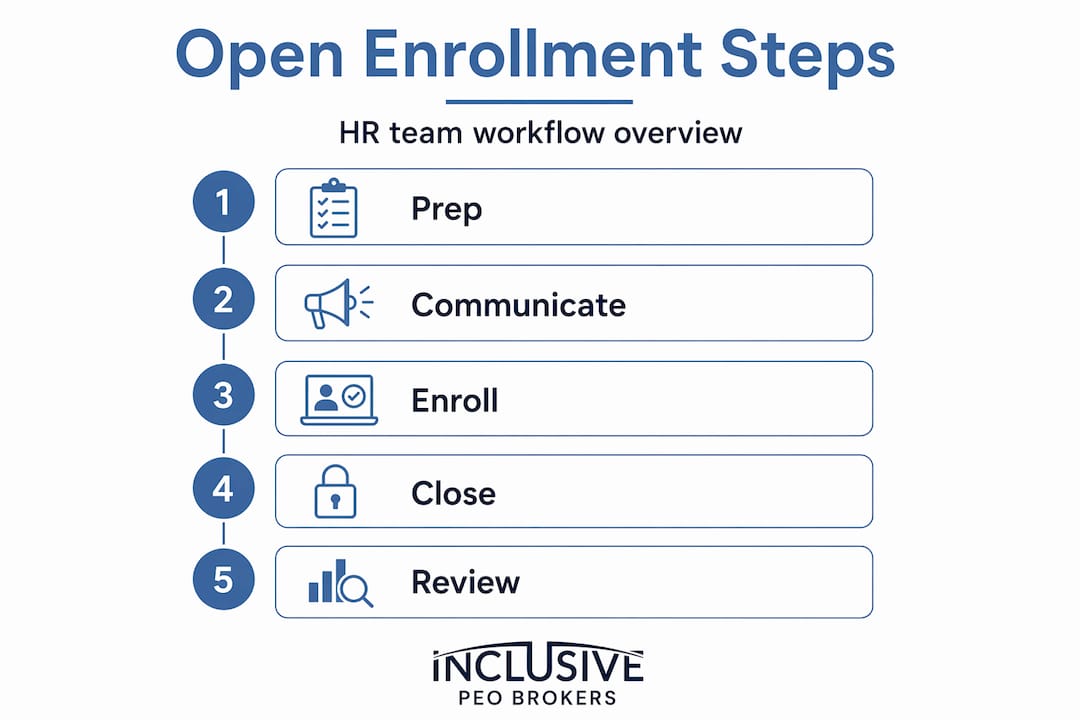
Closing enrollment and post-enrollment compliance
Closing the enrollment window is not the finish line. For HR teams, it is the beginning of a critical verification phase that determines whether your hard work translates into accurate coverage.
Follow these steps once the election window closes:
- Audit all elections before sending data to your carriers and payroll system. Spot-check for duplicate enrollments, missing dependent information, and FSA elections that exceed the legal limit.
- Confirm carrier data transmissions. Most carriers require enrollment files in a specific format within a set number of days after the window closes. Missed transmissions delay coverage.
- Update payroll deductions to reflect new elections accurately. A payroll deduction error caught in January is far easier to fix than one discovered in March.
- Handle non-responders. Understand your plan documents’ rules on auto-renewal. Some plans default non-responders to their prior-year elections; others treat silence as a waiver.
- Process qualifying life event requests that came in during the enrollment window and any that arrive immediately after.
Your compliance obligations do not end at enrollment. SPDs must be distributed within 90 days of coverage starting, and COBRA obligations have strict federal timing rules. Specifically, a General Notice is required within 90 days after coverage begins, and an Election Notice must go out within 14 days of a qualifying event. For employers who also administer their own plans, that window extends to 44 days.
Post-enrollment is also the right time to document what worked and what did not. Track participation rates by department, note where employees asked the most questions, and flag compliance gaps to close before next cycle.

Common challenges and how to handle them
Even well-organized HR teams run into obstacles. Knowing what to expect lets you address issues before they become problems.
- Late planning: The single most common mistake. If you begin communicating with carriers less than two months out, you will almost certainly face last-minute rate surprises and compressed employee communication timelines.
- Employee confusion about plan differences: Many employees underutilize benefits because they do not understand what they are choosing. Simplifying your comparison materials and hosting a live Q&A session can close this gap significantly.
- Technology failures during the enrollment window: Test your enrollment platform before the window opens. Verify that all employees can log in, especially remote workers or those using personal devices.
- Data errors in payroll: A mismatch between what your enrollment system recorded and what your payroll system processes is the most common post-enrollment headache. A pre-submission audit, even a spot-check of 20% of records, catches most errors.
- Low participation rates: If completion rates are below 80%, consider whether your communication is reaching the right people at the right time. Targeted reminders sent to specific employee groups outperform blanket announcements.
Pro Tip: After enrollment closes, survey a sample of employees about their experience. Ask two questions: Did you feel you had enough information to make a confident decision? Was the enrollment process easy to complete? The answers will directly shape what you improve next year.
My take on what actually makes open enrollment succeed
I have worked with dozens of small and mid-sized businesses through multiple enrollment cycles, and I will tell you plainly: the companies that struggle most are not the ones with the fewest resources. They are the ones that treat open enrollment as an annual fire drill instead of a managed process.
The most consistent mistake I see is starting communication too late. You cannot drop a benefits guide on your employees two weeks before the deadline and expect thoughtful elections. People need time. They have families to consult, doctors to check on network status, and financial decisions to weigh. Give them that time and your support calls drop, your participation climbs, and your post-enrollment corrections shrink.
What I have also learned is that post-enrollment is not the endpoint, it is the launchpad. The data you gather after each cycle, who enrolled in what, who waived, where confusion spiked, is genuinely valuable for improving next year’s process. Most teams archive it and move on. The teams I respect most turn it into a 30-minute debrief and a one-page improvement plan.
One thing I am watching closely in 2026 is the evolution of HR and enrollment technology. AI-assisted decision support tools are becoming accessible even for small teams, and SHRM notes HR must continually update their enrollment practices as employee expectations shift. If your enrollment experience still relies entirely on PDF guides and email blasts, you are behind the curve and your employees likely feel it.
The businesses I have seen run genuinely excellent enrollments share one trait: they treat the process as employee-centered, not HR-centered. Every decision, from communication timing to platform choice, is made with the question, “Will this make it easier for my employees to choose confidently?” Start there, and everything else follows.
— John
How a PEO can take the pressure off your enrollment process
If the steps above feel like a full-time project layered on top of your existing responsibilities, you are not imagining it. For many small and mid-sized businesses, benefits administration is genuinely too complex to manage well without dedicated support.

A Professional Employer Organization, or PEO, functions as an off-site HR partner that handles carrier coordination, compliance filings, enrollment platform management, and employee communications alongside you. The result is fewer errors, better plan options, and a process your employees actually trust. Inclusive PEO Brokers specializes in matching small businesses with the right PEO fit, having completed 133 successful implementations and saving clients an average of 80 hours in the selection process. If open enrollment is a pressure point for your team, explore how PEO services for small businesses can give you a better experience next cycle, and every cycle after.
FAQ
What is open enrollment and when does it happen?
Open enrollment is the annual window, typically 2–4 weeks in the fall, when employees can elect or change their benefit coverage for the upcoming plan year, with most calendar-year plans taking effect January 1.
What happens if an employee misses open enrollment?
Employees who miss the election window generally cannot change coverage until the next annual period unless they experience a qualifying life event such as marriage, the birth of a child, or loss of other coverage, which triggers a Special Enrollment Period of approximately 60 days.
What is the Health FSA contribution limit for 2026?
The Health FSA limit for 2026 is $3,400, with a $680 carryover allowed, making it worth highlighting proactively in your employee communications to encourage participation.
What compliance steps are required after enrollment closes?
After enrollment closes, HR must distribute Summary Plan Descriptions within 90 days of coverage starting, meet COBRA General and Election Notice deadlines, and complete any required ACA reporting to stay in federal compliance.
How can small businesses improve open enrollment participation?
Using multi-channel communication, training managers to answer common questions, sending targeted reminders to non-enrolled employees, and providing simple plan comparison tools are the most effective ways to increase completion rates.
Recommended
.svg)
Seeking a different solution? Meet Your Business Needs